
System Requirements
Hardware Requirements
Camera Requirements
| Characteristic | Requirement |
|---|---|
| Primary stream resolution | 1280×720–2560×1920 pixels |
| Secondary stream resolution | 320×288–1280×720 pixels |
| Video frame rate | 10–50 frames per second |
| Primary stream bitrate | up to 8 Mbps |
| Secondary stream bitrate | up to 1 Mbps |
| Video encoding protocol | H.264 HP/MP/BP, H.265 |
| Network protocol support | TCP/IP, ICMP, HTTP, HTTPS, RTP, RTSP, NTP, SNMP, IGMP, IPv4/IPv6 |
| Video transmission protocol | RTP over TCP (RTSP over TCP) |
H.265 video playback is available in the latest version of Google Chrome. The graphics card must support H.265 decoding.
For cameras connected through an ONVIF device, only H.264 video playback is supported.
Get Camera Ready
Due to compatibility and security requirements, IREX does not support a plug-and-play camera connection. A qualified network engineer is required to configure the camera and the router in order to enable video streaming from cameras to the Platform instance.
IREX supports multi-brand cameras. To prepare cameras for connection:
- Ensure the camera has a valid network configuration, including IP address, network mask, gateway, and NTP client configuration. The correct time and timezone are essential for video archiving.
- Use the best security practices to protect the camera: install the latest firmware, generate a strong password, disable third-party cloud connections and unnecessary services.
- Ensure the camera mount position, height, angle of view, and resolution meet the requirements of the video analytics modules planned for this camera. See the specific requirements for each module in Manage Video Analytics.
- Set the video resolution to 1920x1080 or 1920x1440 on the primary stream and 740x480 (NTSC) on the secondary stream. The secondary stream (substream) is an option needed only whenever it comes to video playback in Layouts on video walls.
- Set the video codec to H.264 Baseline Profile or H.265.
-
Set the video codec mode:
VBR (variable bitrate) with a limit up to 5 Mbps (recommended);
CBR (constant bitrate) at 5 Mbps if VBR bitrate limit is lower or the scene is heavily loaded (e.g. airport entrance). - Set the audio code to AAC. G.711ulaw and PCM are also supported. Audio streaming is optional.
- Note the RTSP URL for the primary and secondary streams.
- Test the RTSP URLs in a media player such as VLC; note the bitrate of the video stream.
Server Requirements
Server Infrastructure
The server infrastructure of IREX hardware complex includes the following components:
- Kubernetes processing servers (Kubernetes subcluster). This is a collection of K8S-MASTER and K8S-WORKER server nodes. The total number of nodes in the Kubernetes subcluster depends on the computing capacity required. K8S-LB nodes are responsible for user load balancing and allow linear scaling to an unlimited number of data streams to process (video cameras, special detectors, etc.).
- Ceph storage servers (Ceph subcluster). This is a collection of CEPH-HOT server nodes (CEPH cluster nodes with SSD drives with high read/write speeds). CEPH-WARM server nodes (cluster nodes with HDD disks having standard read/write speed parameters). The total number of CEPH subcluster nodes depends on the required storage capacity. The technology allows linear scaling to an unlimited number of data streams being processed (video cameras, special detectors, etc.).
- AUX servers - responsible for collecting and processing system information, metrics, logs, etc. AUX Servers are responsible for the fast and easy deployment of configurations on multiple servers using techniques used in cloud platforms. Scaling is linear.
Estimate Server Capacity
Commit estimation of the required server capacity to our engineers, since errors might be costly.
Before contacting an IREX representative to estimate the server configuration, have the following information ready:
- The total number of cameras with approximate bitrates
- The type and the approximate number of video analytics modules
- The retention period (archive depth) for video and events
- The maximum size of people and vehicle databases
Network Requirements
The network infrastructure design uses a fast, scalable, and efficient Leaf-Spine communication architecture.
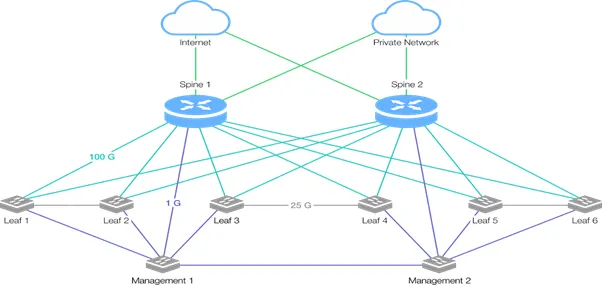
The Leaf-Spine architecture is able to adapt quickly to system demands and scale. The Leaf-Spine architecture has only two layers, with all devices "equidistant" from the "kernel" switches, i.e., they have the same and predictable packet delay. These layers are called Leaf and Spine.
The Leaf layer consists of access switches connected to other data center devices: servers, gateways, load balancers, and terminating switches.
The Spine layer, consisting of routing switches, is the network's core, where each Leaf switch is connected to each of the Spine switches.
Layer 3 dynamic routing is used between layers to provide a predictable distance between devices. Dynamic routing provides the best route for the signal to pass. This architecture is designed to build a horizontally (linearly) scalable solution for data centers and allows the use of other network protocols, as well as methods for building a dynamic network.
The network technologies used:
- Sftp-server
- Vrrp
- Сfs eth distribute
- NV Overlay EVPN
- Ospf
- Bgp
- Pim
- Pbr
- Interface-vlan
- Vn-segment-vlan-based
- Lacp
- Vpc
- Lldp
- Nv overlay
1000-Camera Example Configuration
Ask an IREX representative for the spreadsheet to get an idea of what hardware resources are required to get a 1000-camera IREX Platform instance up and running in a private cloud.
Edge Server Solution
For an edge server architecture, order an estimate from our representative of what hardware it needs and of costs.
Client Hardware in Videowall Mode
Streams from multiple cameras can be projected, each on its own monitor on the client machine (the Videowall mode). This is possible with the client machine having:
- a GPU with multiple outputs
- a CPU powerful enough to decode multiple video streams in real time.
Streams may come in onto the client either from the server via the web interface or directly from the cameras; the latter requires video capture software to be installed on the client.
Software Requirements
The IREX software requires the following free and open-source software to be installed and available:
- Operating System (OS): Ubuntu;
- Kernel: Linux, GNU GPL
- Docker, Apache License
- etcd, Apache License
- MAAS, GNU GPL
- VMWare Harbor, Apache License
- Kubernetes, Apache License
- Ceph, LGPL
- Cassandra, Apache License
- Kafka, Apache License
- PostgreSQL, PostgreSQL License
- Zookeeper, Apache License
- Spark, Apache License
- Elasticsearch, Apache License
- InfluxDB, MIT License
Software versions are not specified for security reasons. Disclosure of a specific software version may lead to the exploitation of existing software vulnerabilities, threatening the security of the monitoring system software.