Vehicle Registration Status Check
The IREX Platform includes a feature that automatically verifies whether each detected license plate corresponds to a vehicle with a valid California DMV registration (i.e., the annual vehicle registration fee has been paid).
 In other states,
legal driving requirements may differ—for example, vehicles may require annually renewable environmental certificates,
technical inspections, or similar approvals. The IREX Platform can support such checks as well,
provided that DMV registration or other authorized datasets are available for import.
In other states,
legal driving requirements may differ—for example, vehicles may require annually renewable environmental certificates,
technical inspections, or similar approvals. The IREX Platform can support such checks as well,
provided that DMV registration or other authorized datasets are available for import.
When this feature is enabled, geo-referenced zones can be defined to run continuous, privacy‑respectful checks.
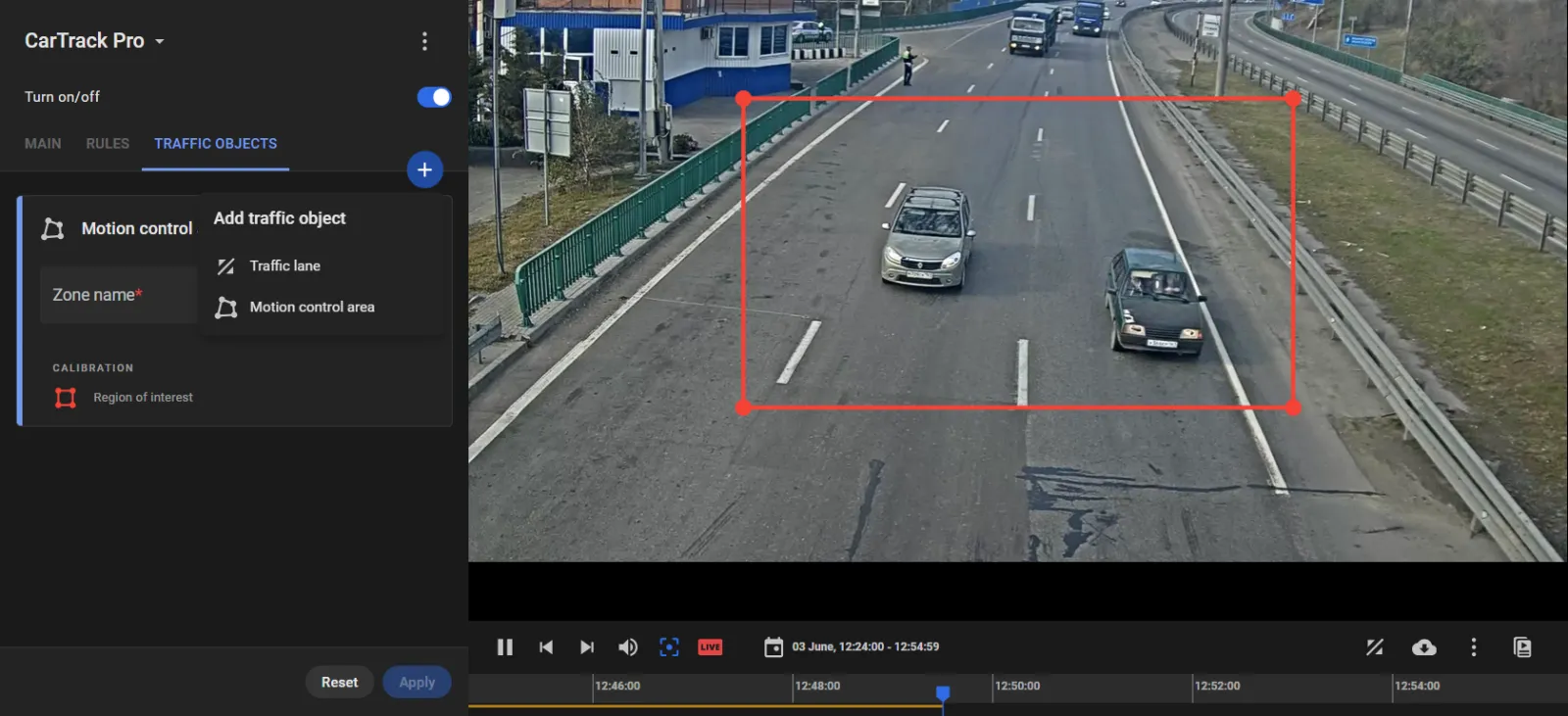
Build this area on the Traffic objects tab in the CartTrack Pro module settings.
- On this tab click "+", then select Motion control area to draw an area in which those permissions are going to be automatically checked based on the vehicle plate number.
- Give the area a clear, meaningful name, e.g., it might be "Technical allowance check area", or "Liability insurance check area", etc., depending on what kind of permissions are going to be checked.
- Click Apply.
- Continue with setting up the check.